Systematically Fixing CUDA in Conda
TLDR
if pip wont solved the problem, use conda. if conda wont work, use conda --update-all to update all the packages, or conda --force-reinstall to reinstall the package. No need to reboot the system, may need to restart the python kernel.
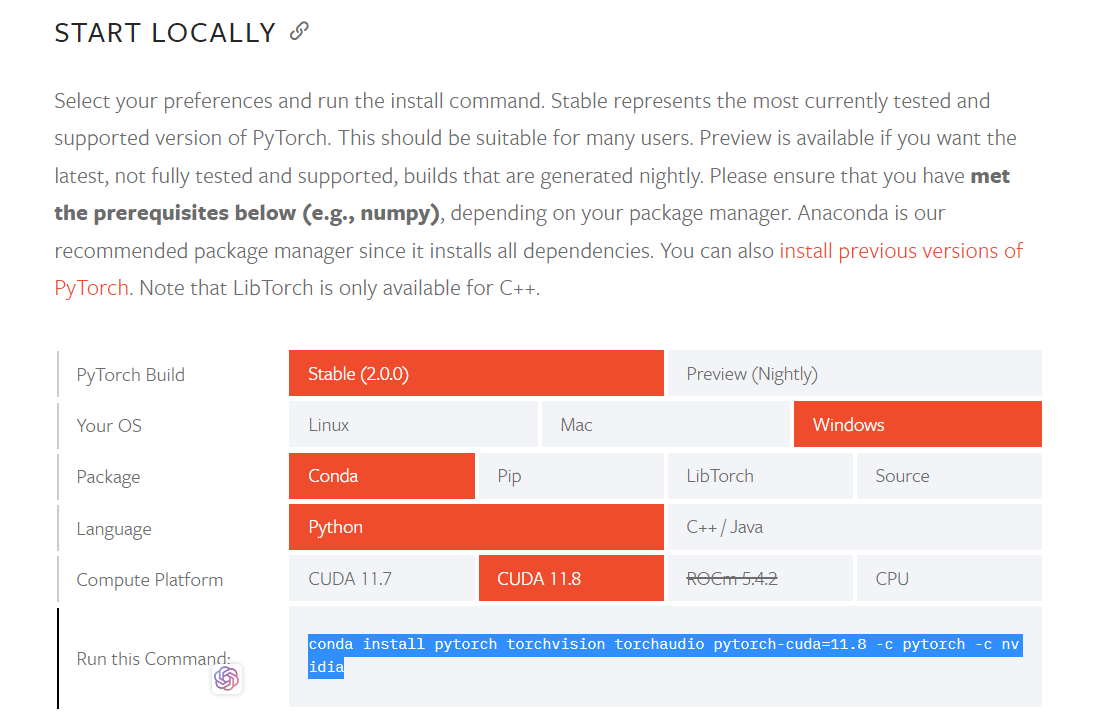
use the officially instructed command on Pytorch website. choose the right version of cuda and pytorch.
Sytematic Review
Normally cuda is not available is caused by Pytorch and cuda version mismatch. If both are installed correctly and the newest version, the problem is caused by the package management system pip or conda.
Python environment management is a pain. Conda, pip, diffrent version of python always messed up. Normally People will have two Python installed in their PC: one from anaconda and another from python.org. But when running in terminal or running pip, only the python from python.org will be used. Uninstalled the python.org python wont work cause its still in the path or the conda python is not in the $PATH environment.
pip turns out to be a fast but incomplete solution. while conda is a slow but complete solution. if they both wont fix the package problem, try to do force reinstall or update all in conda.
Story
I was tring to train a vision transformer on my local machine. However is painfully slow. I did use GPU. So i download the notebook i refer to from Kaggle and tried to run it all to see if the original example notebook would works.
Boom! There are some pip install and !curl env_setup.py command inside. After the run all, suddenly my cuda is not available anymore.
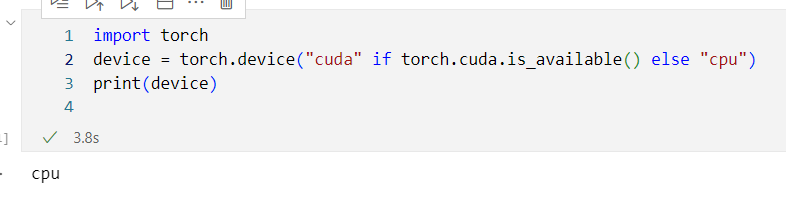
I began to search for solution. One said the cuda version and pytorch version is not matched. emm, i did have fixed this before when i was trying to install pytorch. I installed the right cuda, have or had the right pytorch version, and cuda is available before i run the notebook.
But it did not work now. So i tried to reinstall. I used the given command in official pytorch website, run conda install pytorch torchvision torchaudio pytorch-cuda=11.8 -c pytorch -c nvidia But It did not work. Then i tried pip pip3 install torch torchvision torchaudio --index-url https://download.pytorch.org/whl/cu118 But it did not work either.
Then i read the output from that evil notebook.
Found existing installation: torch 2.0.0+cu118
Uninstalling torch-2.0.0+cu118:
  Successfully uninstalled torch-2.0.0+cu118
Found existing installation: torchvision 0.13.1a0
Uninstalling torchvision-0.13.1a0:
  Successfully uninstalled torchvision-0.13.1a0
Looks like it uninstalled my pytorch. i should use torch2.0.0_cu118. But i did rerun the install command. Whats wrong? Should i reboot?
I did a laptop reboot, but still torch.cuda.is_available() return False.
Then i run conda list torch, looks like this
Name                    Version                   Build  Channel
pytorch-cuda              11.8                 h24eeafa_3    pytorch
pytorch-mutex             1.0                        cuda    pytorch
torch                     2.0.0                    pypi_0    pypi
torchaudio                2.0.1+cu118              pypi_0    pypi
torchvision               0.15.0               py39_cu118    pytorch
Looks like i do have a pytorch with cuda 11.8. But why torch.cuda.is_available() return False? run nvcc --version return
$nvcc --version
nvcc: NVIDIA (R) Cuda compiler driver
Copyright (c) 2005-2022 NVIDIA Corporation
Built on Mon_Oct_24_19:40:05_Pacific_Daylight_Time_2022
Cuda compilation tools, release 12.0, V12.0.76
Build cuda_12.0.r12.0/compiler.31968024_0
i have cuda12 installed, but the pytorch cuda11.8 is compatible with cuda12. Reinstall and reinstall again with instruciton conda install pytorch torchvision torchaudio pytorch-cuda=11.8 -c pytorch -c nvidia or pip3 install torch torchvision torchaudio --index-url https://download.pytorch.org/whl/cu118 still not work.
Actually, after running pip3 install torch torchvision torchaudio --index-url https://download.pytorch.org/whl/cu118, the situation is worse in conda list torch, download from pypi via pip, torch version is downgraded to 1.13.1, when the newest version is 2.0.0 already:
# Name                    Version                   Build  Channel
pytorch-cuda              11.8                 h24eeafa_3    pytorch
pytorch-mutex             1.0                        cuda    pytorch
torch                     1.13.1                   pypi_0    pypi
torchaudio                2.0.1+cu118              pypi_0    pypi
torchvision               0.15.1                   pypi_0    pypi
now run conda install pytorch torchvision torchaudio pytorch-cuda=11.8 -c pytorch -c nvidia again:
# Name                    Version                   Build  Channel
pytorch                   2.0.0           py3.9_cuda11.8_cudnn8_0    pytorch
pytorch-cuda              11.8                 h24eeafa_3    pytorch
pytorch-mutex             1.0                        cuda    pytorch
torch                     2.0.0                    pypi_0    pypi
torchaudio                2.0.0                    pypi_0    pypi
torchvision               0.15.1                   pypi_0    pypi
The correct version when run conda list torch should be
# Name                    Version                   Build  Channel
pytorch                   2.0.0           py3.9_cuda11.8_cudnn8_0    pytorch
pytorch-cuda              11.8                 h24eeafa_3    pytorch
pytorch-mutex             1.0                        cuda    pytorch
torch                     2.0.0                    pypi_0    pypi
torchaudio                2.0.1+cu118              pypi_0    pypi
torchvision               0.15.1                   pypi_0    pypi
The only difference is pytorch 2.0.0 py3.9_cuda11.8_cudnn8_0 pytorch.
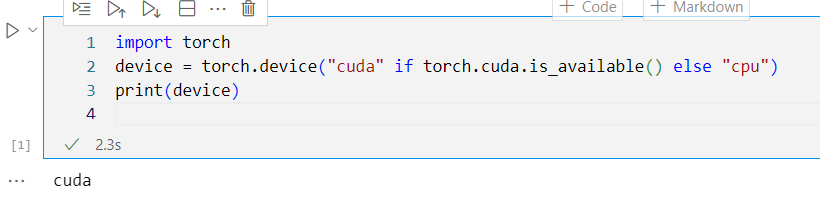
we good to train our neural network on gpu now.
Summary
pip wont work, use conda. if conda wont work, use conda --update-all to update all the packages, or conda --force-reinstall to reinstall the package.
For strange reason, I am only to replicate the bug for the first time i run the notebook, and get cuda.available return false. Afterwards torch wont be able to imported. it can be easily solved by running the recommand conda install command in pytorch website. For the first time replicated bug, this is solved by conda install pytorch torchvision torchaudio pytorch-cuda=11.8 -c pytorch -c nvidia --update-all.
The only difference is
# Name                    Version                   Build  Channel
pytorch                   2.0.0           py3.9_cuda11.8_cudnn8_0    pytorch
which got to be uninstalled by the evil notebook. eventhough we have the pytorch-cuda, we still need the base pytorch package to run.